Run AI agents as a team. Show your client a live page, not a status thread.
orch walks a graph of tasks, hands each one to the coding agent you route it to — Claude Code, Codex, OpenCode — in parallel, keeps spend inside a budget per provider, and publishes a page your client can open to see where the work stands.
orch run
nextjs-saas template, routed to three agents. A task starts only when everything it depends on is done; the client page counts what is finished.How it works
-
Write the work down
Describe the work as markdown specs — phases, packages, tasks, the model for each and what it depends on.
orch atomizeturns them intotasks.jsonand shows you the diff before anything is written. Or start from one of five project templates.$ orch init --template nextjs-saas $ orch tasks Tasks (6 shown) ID STATUS BACKEND/MODEL DEPS F0.T1 todo claude/claude-sonnet-4-6 — F1.T1 todo claude/claude-sonnet-4-6 [F0.T1] F1.T2 todo claude/claude-sonnet-4-6 [F1.T1] F2.T1 todo claude/claude-sonnet-4-6 [F0.T1] F2.T2 todo claude/claude-sonnet-4-6 [F1.T1 F2.T1] F3.T1 todo claude/claude-sonnet-4-6 [F0.T1 F2.T1] -
Route each task to an agent
model_router.yamlmaps every model name to the CLI that runs it:claude,codex,opencode,geminioragy, with your own logins and your own keys. Concurrency caps and a rolling token budget per provider decide how much runs at once and when to stop.$ orch explain Tasks: 6 total, 0 done (0%) todo 6 blocked 0 Ready to dispatch: 1 F0.T1 Next.js 14 App Router scaffold + Tailwind + shadcn/ui -
Run it
orch rundispatches every ready task at once, each in its own git worktree and branch. It opens a pull request per task, watches CI, retries what failed for a reason worth retrying, and blocks — with the reason written down — what should not be retried. Ctrl+C drains: nothing new starts, work in flight finishes.$ orch run --worktree-mode $ orch status $ orch events F2.T2 -
Hand your client a link
orch publishwrites the client page as a static site — milestones, blockers in plain language, how fresh the numbers are — to a folder or agh-pagesbranch, and keeps it current with--watch. No login, no API, nothing of yours exposed.$ orch publish --to git --watch $ orch dashboard --profile stakeholder --tunnel
What your client sees
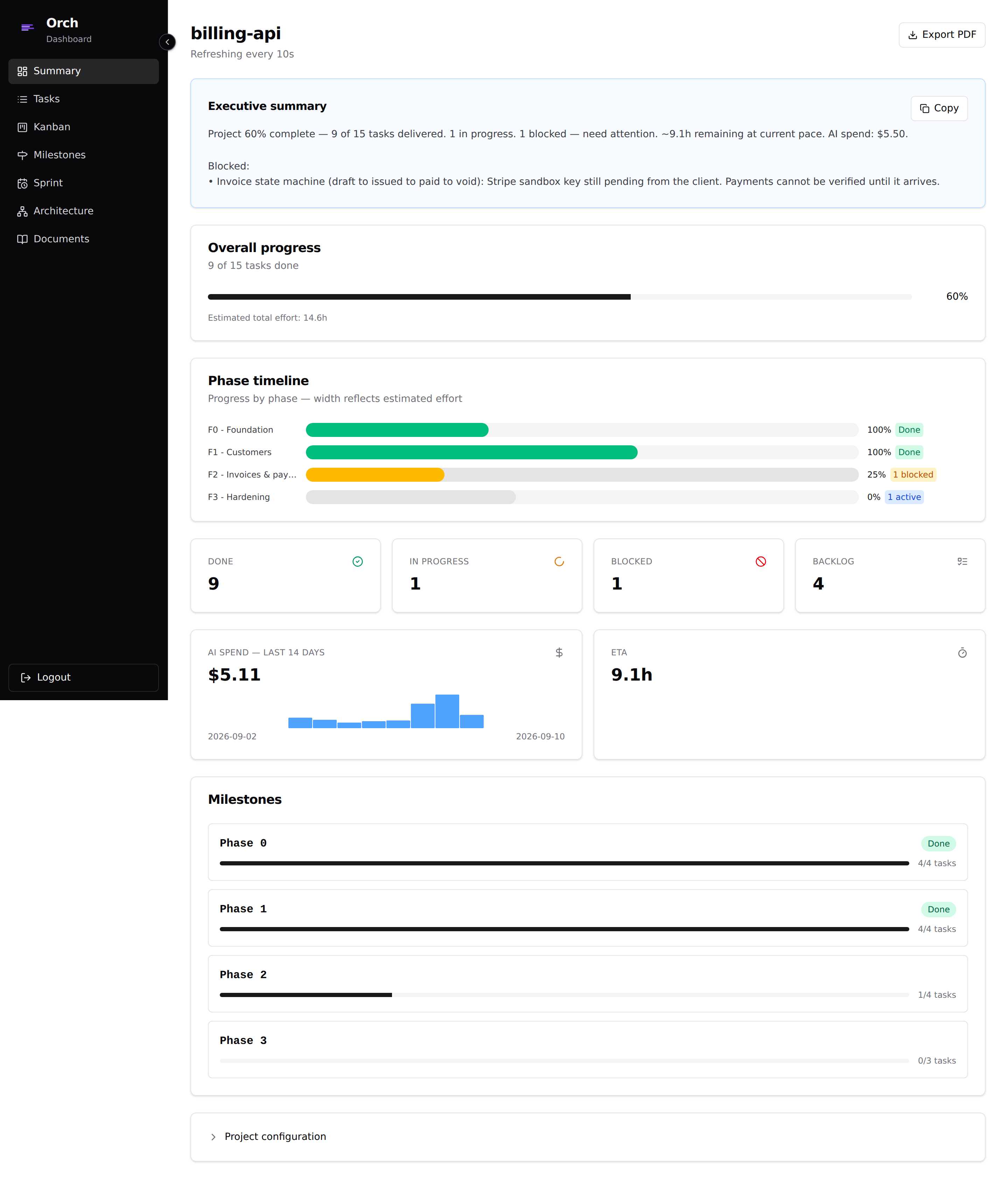
The page is built from one snapshot of the project, written for someone who does not care what a worktree is.
- Progress by milestone, in the names you gave them.
- Blockers translated out of stack traces into sentences.
- An estimate of the hours left, and how fresh the numbers are.
- Spend only if you choose to show it. It is off by default.
- Your agency's name, logo and colour instead of orch's, if you set them.
Where orch stops
- It runs on your machine.
- No daemon and no hosted service. You start
orch run; it stops when the queue is empty or you stop it. - The agents are yours to install.
- orch drives the CLIs you already use and are signed in to. It never holds a model key.
- It is one operator's tool.
- Several projects at once, yes. Several people editing the same plan, no — that is a project tracker's job.
- Gemini needs one decision from you.
- Gemini CLI refuses to run in a directory it was not told to trust, and every task gets a fresh worktree. orch does not switch that check off for you.
Install
orch is a single binary for Linux and macOS. The first binary release is v0.12.0 and is not tagged yet; until it is, build from source with Go 1.25+ and pnpm.
From source, today
git clone https://github.com/hectorcanaimero/orch
cd orch
make build
./bin/orch --version
From v0.12.0
curl -fsSL https://raw.githubusercontent.com/hectorcanaimero/orch/main/scripts/install.sh | sh
brew install hectorcanaimero/orch/orch
Then, in a project: orch init, orch install-skills --all to give your agent the planning skills, and orch doctor to check that every CLI your tasks route to is installed and signed in.